
From a shared spreadsheet to one live tracker
In five weeks, Chipp replaced Pacific Neuroscience Center’s shared fMRI spreadsheet with one live tracker for three organizations. The first working version was live on kickoff day. On October 27, 416 cases moved across with zero import errors, and the spreadsheet was retired.
- 416 cases moved with zero import errors on the first live run. The spreadsheet was retired on October 27.
- One shared tracker. Every handoff is a click by a named person, saved with the time.
- Built on Chipp with HIPAA mode and a signed BAA, in place ahead of any patient data.
Cases moved from the sheet, with zero import errors
From kickoff to cutover, Sep 24 to Oct 27, 2026
First working version, live on the day of the kickoff call
- Chipp
- HIPAA mode
- Signed BAA
- PNC
- SVMI
- Synaptec
The challenge
PNC refers patients for fMRI scans, often paid through a lien on a personal-injury case. Each case moves from PNC to SVMI, which gets the lien approved by the patient’s law office, schedules the scan and uploads the images. Synaptec reviews the images, then PNC writes the report and files it in the EHR. A ten-tab Google Sheet was the only record of where each case stood.
What we found on day one
- Lost edits
The sheet’s sync script skipped 180 edits between Aug 12 and Sep 10.
- Conflicting statuses
Tabs disagreed with each other: 47 cases “Denied” on one, 52 on another.
- No history
Only 35 of 411 referrals had a timestamp, so turnaround could not be measured.
- A false picture of the workload
53 cases looked open but had already been closed by a denial or an appointment outcome.
- No rule for stalled cases
Cases waiting on unresponsive law offices stayed in the active queue.
- Failed migrations
Three earlier attempts to move this data had failed, so the team was wary.
What we built
One shared tracker where every handoff is a click by a named person, saved with the time. The case moves straight to the next organization’s queue.
- 1PNCOpen and refer
PNC opens the case and sends the referral. Status: Referred.
- 2SVMILien, booking, scan
SVMI gets the lien approved by the law office, books the scan and uploads the images. Status: Scanned.
- 3SynaptecImage review
Synaptec reviews the images. Status: Reviewed.
- 4PNC, with SVMIReport and EHR
PNC writes the report and files it in the EHR. Status: Complete.
How it works
- 01Every handoff is a click by a named person, saved with the time
- 02The case moves straight to the next organization’s queue
- 03Everyone sees every case, and each organization records only its own steps
- 04Every step runs against a business-hour target: green is on track, red is overdue, in plain words
Key mechanics
- A queue for each organization
PNC, SVMI and Synaptec each see their own work, most overdue first.
- Overdue in plain words
“Overdue by 4 business days (target 5 business days).” Green on track, red overdue.
- Stalled cases leave the queue
After 30 days with no answer or no booking, a case moves to the holding list, checked weekly. After 90 days there, it closes as No Response.
- Full history and undo
Each click stores who, when and the case as it was before, so any step can be undone and audited.
- Four case types, four paths
PNC lien, outside lien, cash pay and INPM cash pay skip or add steps and route the report.
- Notes where they matter
Every answer other than an approval, and every contact attempt, needs a note.
- A review list for the physician
Refused, unable and already-scanned cases go to the ordering physician to decide.
- A migration that checks first
A reconciliation report for sign-off, then every case written in one transaction.
The path of a case
- Case type
- Sets the path.
- SVMI
- Referral sent to SVMI, lien approved by the law office, up to 5 contact attempts, then the scan and the AMBRA upload.
- Synaptec
- Images good, redo or incomplete. Saved to Dropbox.
- PNC
- Viewer, template, report. SVMI sends the report out, and it is uploaded to the EHR.
Inside the app
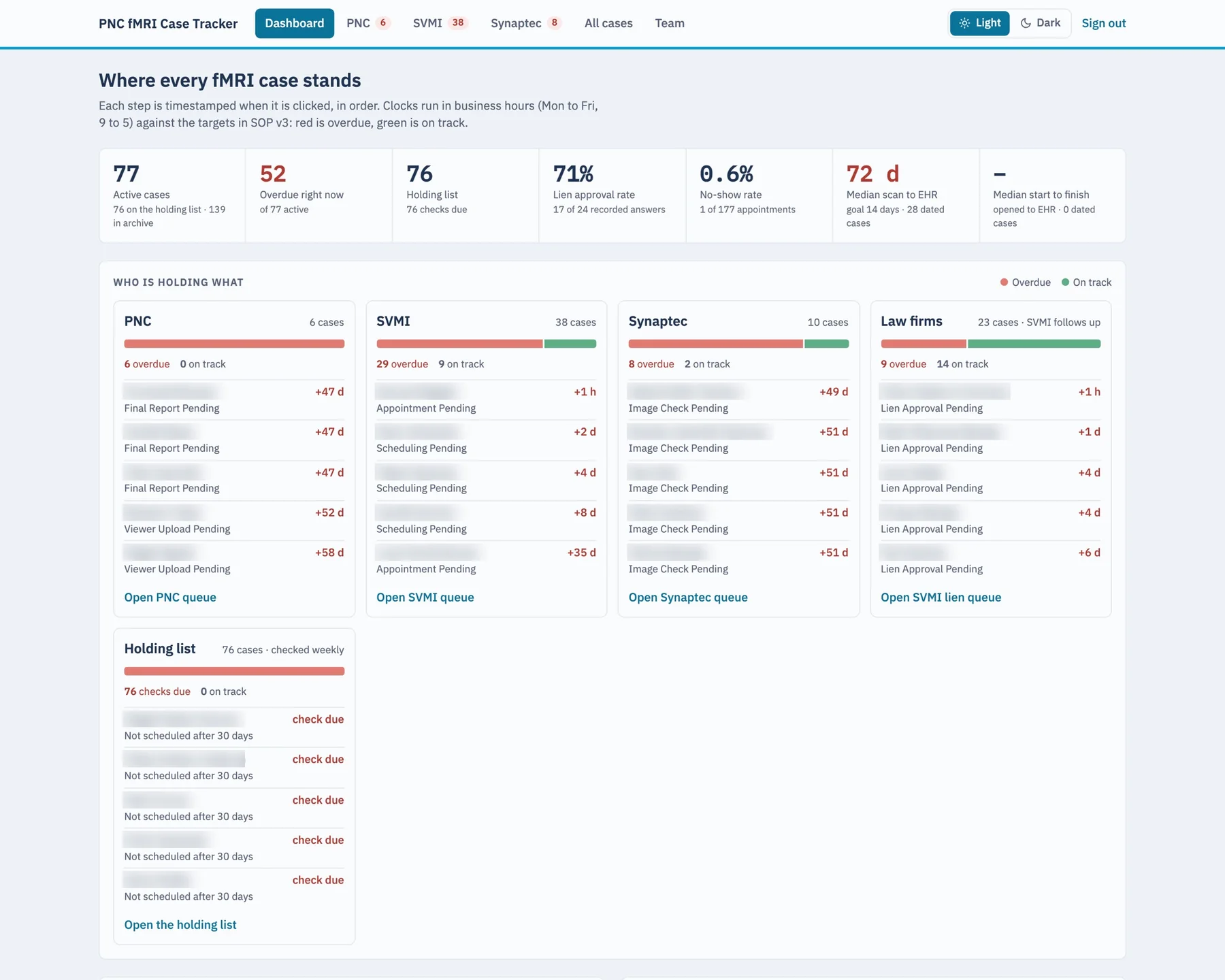
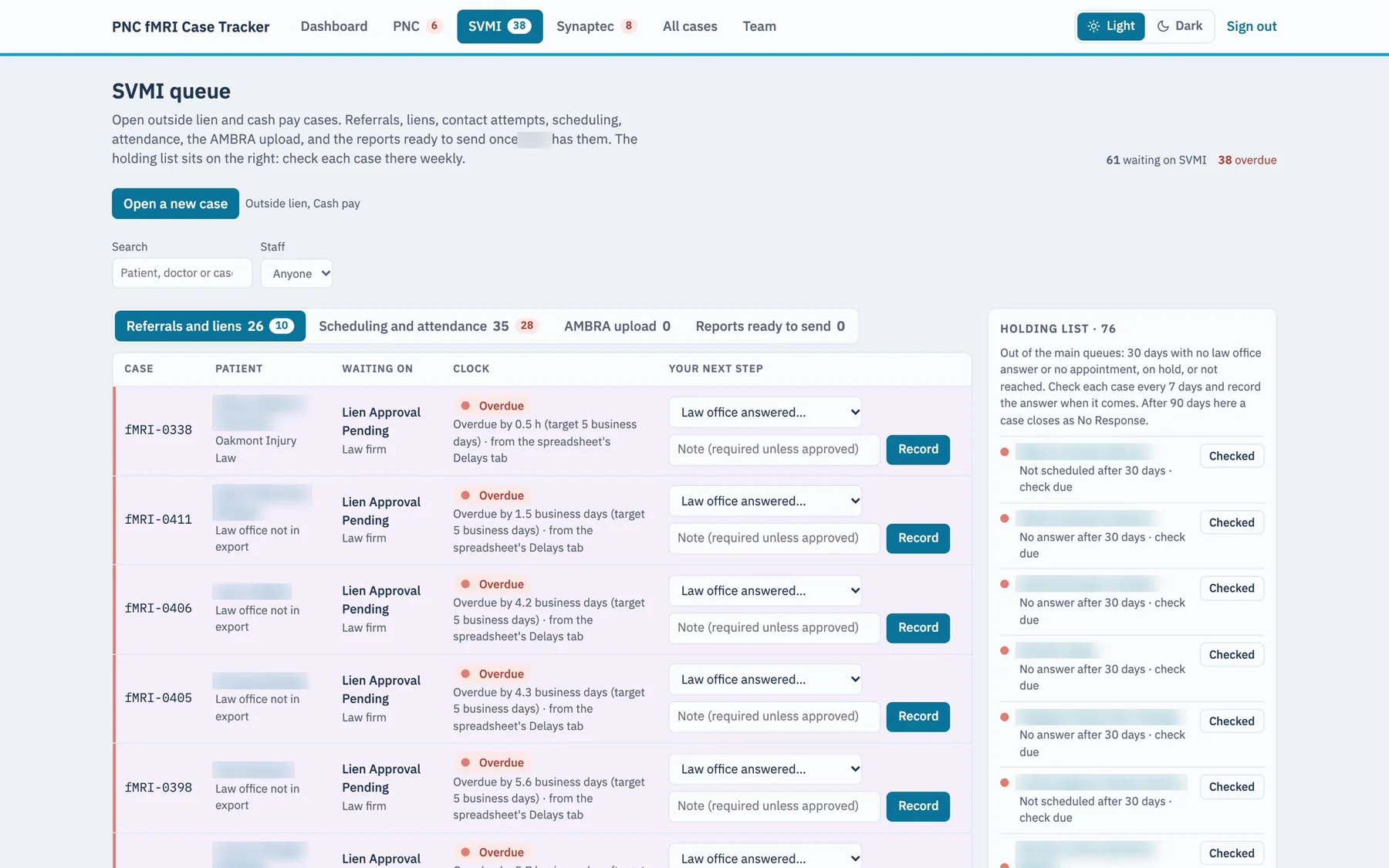
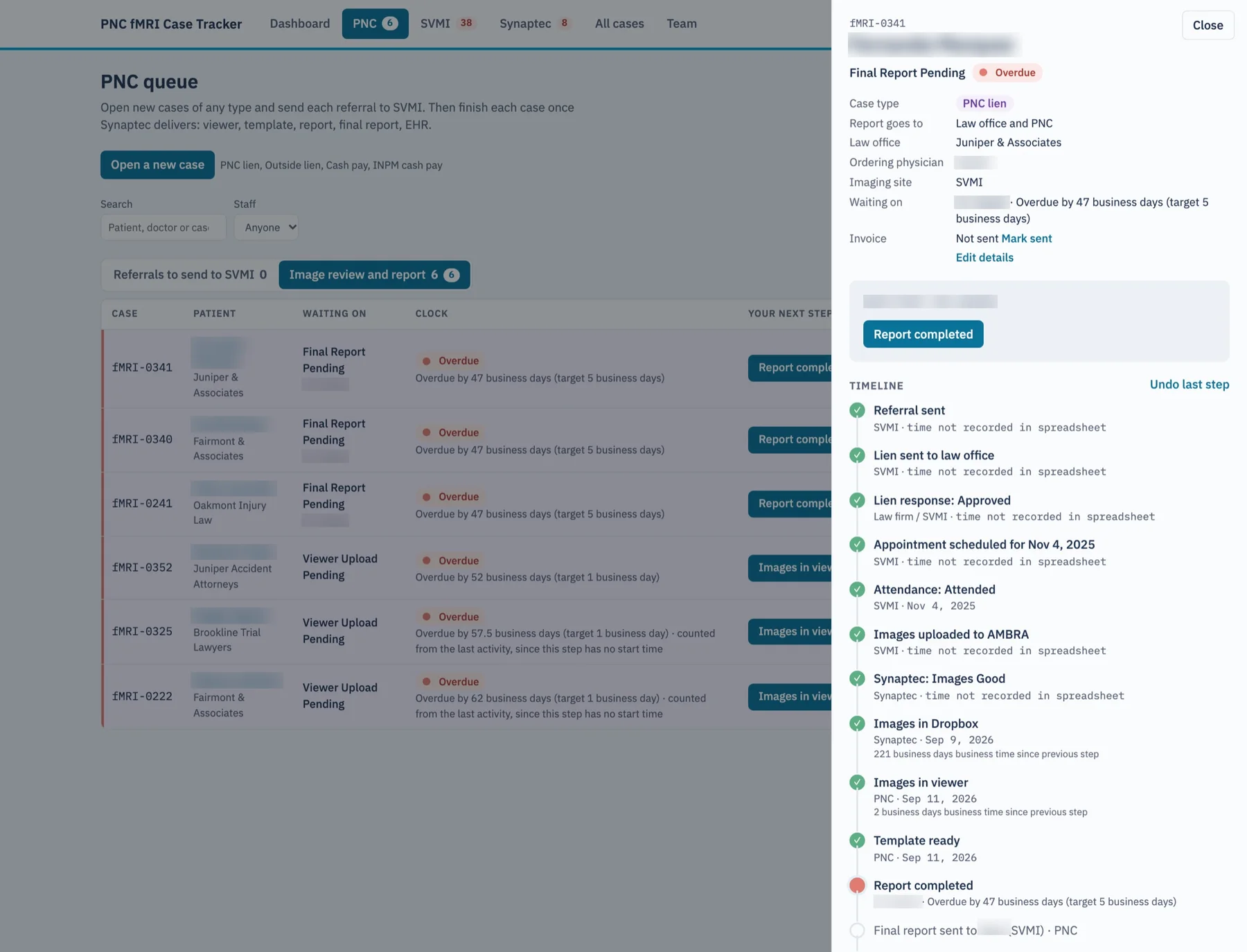
All screenshots use the tracker’s synthetic sample data, never patient records. Names are blurred.
Delivery
- Sep 24Day 0Kickoff
- The prototype became a live app with saved cases and per-company steps.
- Oct 9Day 15Workflow review
- Case types, holding list, required notes, red and green clocks. Built that day.
- Oct 15Day 21BAA signed
- Signed live on the call, ahead of any patient data.
- Oct 22Day 28Video review
- PNC can open every case type, and SVMI gets four tabs. Built that day.
- Oct 23Day 29Launch call
- 30- and 90-day holding rules, and a simpler new-case form. Built that day.
- Oct 27Day 33Cutover
- HIPAA mode on, and 416 cases imported with zero errors.
Feedback, built the same day
Each round of client feedback was built the same day it was given. PNC named a single point of contact for changes, which kept scope contained.
Results
Three migrations had failed. This one moved every case on its first live run.
- Spreadsheet retired
The tracker has been the only record since October 27.
- Data corrected in the move
Statuses were rebuilt from the steps actually recorded. The September dry run found 53 cases the sheet showed as open that were already closed.
- A client who can build
PNC’s point of contact was trained on the Chipp builder so she can make small changes herself.
- Still shipping
More than 25 change requests from PNC shipped by November 20.
Before and after
Three organizations.

What's next
- 01BHMI joins
A fourth organization, with its own queue and SVMI’s steps.
- 02PNC’s own domain
The tracker at an address such as app.pacneurocenter.com.
- 03Document Hub
A separate project for law-firm referral trends from EHR data.
Still running a process out of a shared spreadsheet?
Book 20 minutes. We build your first version with you, live, on your data.