# Parameter Configuration
Configure headers, query, body, and path parameters for your custom actions
Custom actions require a Pro plan or higher.
Upgrade to Pro →
## Parameter Types
### Headers
HTTP headers sent with your request.
```json
{
"Authorization": "Bearer {{var.API_KEY}}",
"Content-Type": "application/json",
"X-User-ID": "{{system.user_id}}"
}
```
### Query Parameters
URL parameters appended to your endpoint.
```bash
GET https://api.example.com/search?q={{query}}&limit=10&page={{page}}
```
### Body Parameters
JSON data sent in POST, PUT, and PATCH requests.
```json
{
"name": "{{userName}}",
"email": "{{userEmail}}",
"metadata": {
"source": "chipp",
"timestamp": "{{system.timestamp}}"
}
}
```
### Path Parameters
Dynamic URL segments replaced at runtime.
```bash
https://api.example.com/users/{{userId}}/posts/{{postId}}
https://api.example.com/users/123/posts/456
```
## Parameter Sources
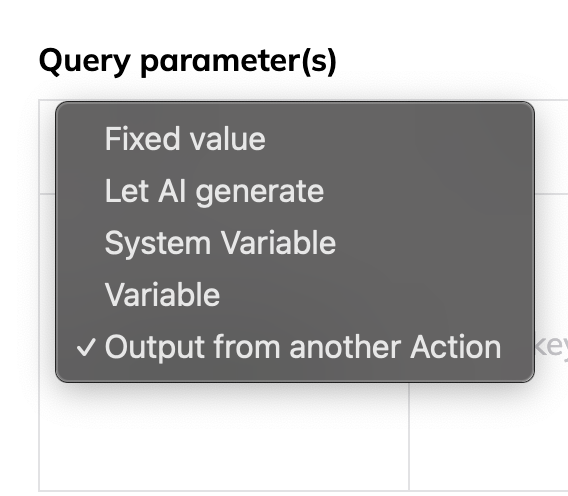 ### Fixed Value
Static values that never change.
| Setting | Value |
| ---------- | ------------- |
| **Source** | Fixed value |
| **Key** | `api_version` |
| **Type** | String |
| **Value** | `v2` |
**Use for**: API versions, static identifiers, constant headers
### Let AI Generate
Dynamic values determined by AI based on context.
### Fixed Value
Static values that never change.
| Setting | Value |
| ---------- | ------------- |
| **Source** | Fixed value |
| **Key** | `api_version` |
| **Type** | String |
| **Value** | `v2` |
**Use for**: API versions, static identifiers, constant headers
### Let AI Generate
Dynamic values determined by AI based on context.
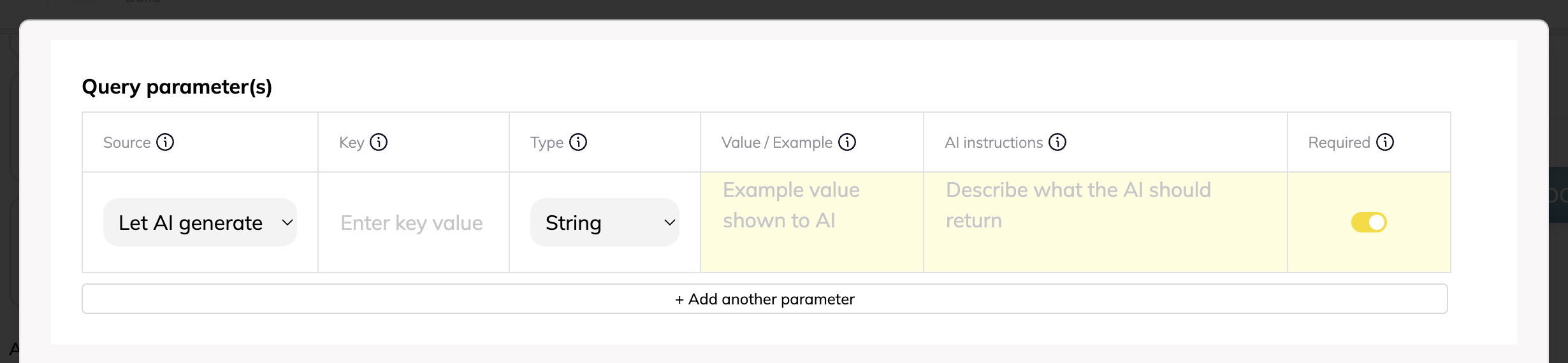 | Setting | Value |
| ------------------- | ---------------------------------------------- |
| **Source** | Let AI generate |
| **Key** | `search_query` |
| **Type** | String |
| **Example** | `customer support tickets` |
| **AI Instructions** | `Extract the search term from user's question` |
| **Required** | ✓ |
**Use for**: Search queries, dynamic filters, contextual values
### System Variables
Platform-provided runtime values.
| Setting | Value |
| ------------------- | ---------------------------------------------- |
| **Source** | Let AI generate |
| **Key** | `search_query` |
| **Type** | String |
| **Example** | `customer support tickets` |
| **AI Instructions** | `Extract the search term from user's question` |
| **Required** | ✓ |
**Use for**: Search queries, dynamic filters, contextual values
### System Variables
Platform-provided runtime values.
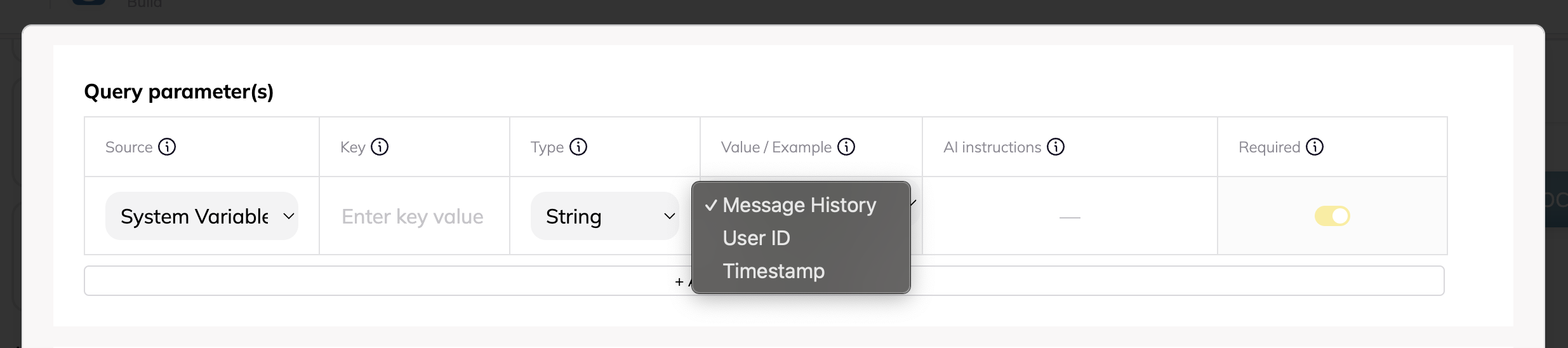 | Variable | Type | Description |
| ---------------------------- | ------ | ------------------------- |
| `{{system.message_history}}` | Array | Full conversation history |
| `{{system.user_id}}` | String | Current user's ID |
| `{{system.timestamp}}` | String | Unix timestamp |
**Use for**: User context, audit trails, conversation analysis
### Application Variables
Reusable values defined at the application level.
| Setting | Value |
| --------------- | ----------------- |
| **Source** | Variable |
| **Variable** | `API_KEY` |
| **Resolves to** | `{{var.API_KEY}}` |
**Use for**: API keys, base URLs, workspace IDs
### Output from Another Action
Use results from previously executed actions as inputs for subsequent actions. This creates powerful multi-step workflows where data flows between API calls.
| Variable | Type | Description |
| ---------------------------- | ------ | ------------------------- |
| `{{system.message_history}}` | Array | Full conversation history |
| `{{system.user_id}}` | String | Current user's ID |
| `{{system.timestamp}}` | String | Unix timestamp |
**Use for**: User context, audit trails, conversation analysis
### Application Variables
Reusable values defined at the application level.
| Setting | Value |
| --------------- | ----------------- |
| **Source** | Variable |
| **Variable** | `API_KEY` |
| **Resolves to** | `{{var.API_KEY}}` |
**Use for**: API keys, base URLs, workspace IDs
### Output from Another Action
Use results from previously executed actions as inputs for subsequent actions. This creates powerful multi-step workflows where data flows between API calls.
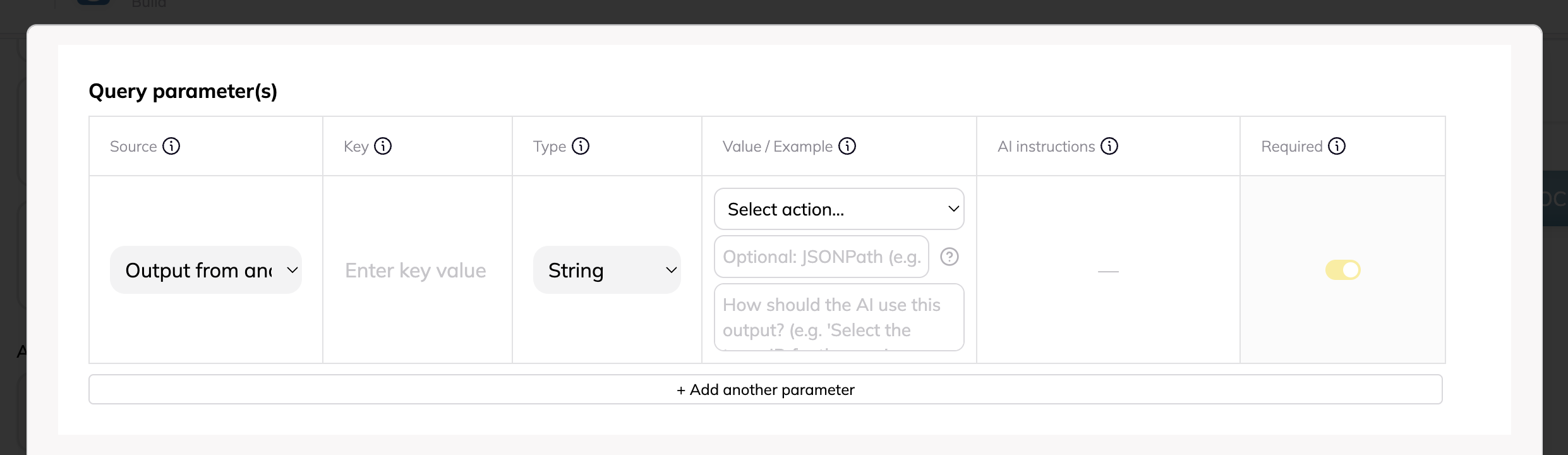 **Configuration Fields:**
| Setting | Description | Example |
| ------------ | ----------- | ------- |
| **Source** | Select "Output from another Action" | - |
| **Action** | Choose which action's output to use | `Get User Profile` |
| **JSONPath** | Path to extract specific value (optional) | `$.data.organization.id` |
| **Context** | Instructions for AI on how to use the output | `Use the user's primary organization` |
**How it works:**
1. The prerequisite action runs first and returns data
2. The JSONPath selector extracts the needed value (or uses full response if blank)
3. The extracted value replaces the parameter in your current action
4. If the prerequisite hasn't run yet, the AI automatically runs it first
**JSONPath Examples:**
```javascript
$.id // Top-level field: {"id": "123"} → "123"
$.data.user.email // Nested field: {"data": {"user": {"email": "a@b.com"}}} → "a@b.com"
$.items[0].name // First array item: {"items": [{"name": "First"}]} → "First"
$.items[*].id // All IDs: {"items": [{"id": 1}, {"id": 2}]} → [1, 2]
$.data.users[?(@.active)] // Filtered: active users only
```
**Real-World Example:**
**Scenario:** Create a support ticket for a user's organization
**Action 1: Get User Details**
- Returns: `{"user": {"id": "u123", "org_id": "org456", "name": "John"}}`
**Action 2: Create Ticket**
- Parameter: `organization_id`
- Source: Output from another Action
- Action: Get User Details
- JSONPath: `$.user.org_id`
- Result: Parameter receives "org456"
**Important: JSONPath is Optional**
You have two options for extracting data:
1. **With JSONPath** (precise): Specify exact path like `$.data.id` to extract a specific value
2. **Without JSONPath** (AI-powered): Leave blank and use the Context field to describe what you need. The AI will intelligently find and use the right value from the response.
**Example without JSONPath:**
- Action returns: `{"user": {"id": "123", "email": "john@example.com"}, "org": {"id": "456"}}`
- Context: "Use the organization ID from the response"
- Result: AI extracts "456" automatically
**Tips:**
- JSONPath is optional - the Context field alone often works perfectly
- Test JSONPath at [jsonpath.com](https://jsonpath.com) with sample data if you need precision
- Actions with dependencies show a link icon in your action list
- The AI is smart about finding the right values based on your context description
**Use for**: Multi-step workflows, data enrichment, sequential API operations
## Data Types
### String
Text values, URLs, identifiers.
```json
{
"name": "John Doe",
"url": "https://example.com"
}
```
### Number
Integers and decimals.
```json
{
"count": 42,
"price": 19.99
}
```
### Boolean
True/false values.
```json
{
"active": true,
"verified": false
}
```
### Object
Nested JSON structures.
```json
{
"metadata": {
"tags": ["important", "urgent"],
"properties": {
"color": "blue"
}
}
}
```
### Array
Lists of values.
```json
{
"tags": ["api", "integration", "automation"],
"ids": [1, 2, 3]
}
```
## AI Generation Guidelines
### Writing Effective Instructions
**Good Example:**
```
Generate a professional email subject line (max 100 chars) based on the email content. Include the recipient's name if mentioned.
```
**Bad Example:**
```
Make a subject
```
### Providing Sample Values
Sample values teach the AI about format expectations:
| Parameter | Sample Value | AI Learns |
| --------- | -------------- | -------------------------------- |
| `phone` | `+1-555-0123` | Include country code with dashes |
| `date` | `2024-03-15` | Use ISO 8601 format |
| `slug` | `my-blog-post` | Lowercase with hyphens |
### Required vs Optional
- **Required**: AI must provide a value or the action fails
- **Optional**: AI includes only when relevant
## Advanced Patterns
### Nested Parameters
Configure complex JSON structures:
```bash
response_format.type = "json_schema"
response_format.json_schema.strict = true
response_format.json_schema.name = "analyze"
{
"response_format": {
"type": "json_schema",
"json_schema": {
"strict": true,
"name": "analyze"
}
}
}
```
### Mixed Sources
Combine different parameter sources:
```json
{
"api_key": "{{var.API_KEY}}", // Variable
"user_id": "{{system.user_id}}", // System
"query": "{{searchTerm}}", // AI generated
"limit": 10, // Fixed
"org_id": "{{previousAction.org_id}}" // Dependency
}
```
### Conditional Parameters
AI determines whether to include optional parameters:
```json
{
"filter": {
"source": "Let AI generate",
"required": false,
"instructions": "Include only if user specifies filtering criteria"
}
}
```
## Testing Parameters
### 1. Use the Built-in Tester
**Configuration Fields:**
| Setting | Description | Example |
| ------------ | ----------- | ------- |
| **Source** | Select "Output from another Action" | - |
| **Action** | Choose which action's output to use | `Get User Profile` |
| **JSONPath** | Path to extract specific value (optional) | `$.data.organization.id` |
| **Context** | Instructions for AI on how to use the output | `Use the user's primary organization` |
**How it works:**
1. The prerequisite action runs first and returns data
2. The JSONPath selector extracts the needed value (or uses full response if blank)
3. The extracted value replaces the parameter in your current action
4. If the prerequisite hasn't run yet, the AI automatically runs it first
**JSONPath Examples:**
```javascript
$.id // Top-level field: {"id": "123"} → "123"
$.data.user.email // Nested field: {"data": {"user": {"email": "a@b.com"}}} → "a@b.com"
$.items[0].name // First array item: {"items": [{"name": "First"}]} → "First"
$.items[*].id // All IDs: {"items": [{"id": 1}, {"id": 2}]} → [1, 2]
$.data.users[?(@.active)] // Filtered: active users only
```
**Real-World Example:**
**Scenario:** Create a support ticket for a user's organization
**Action 1: Get User Details**
- Returns: `{"user": {"id": "u123", "org_id": "org456", "name": "John"}}`
**Action 2: Create Ticket**
- Parameter: `organization_id`
- Source: Output from another Action
- Action: Get User Details
- JSONPath: `$.user.org_id`
- Result: Parameter receives "org456"
**Important: JSONPath is Optional**
You have two options for extracting data:
1. **With JSONPath** (precise): Specify exact path like `$.data.id` to extract a specific value
2. **Without JSONPath** (AI-powered): Leave blank and use the Context field to describe what you need. The AI will intelligently find and use the right value from the response.
**Example without JSONPath:**
- Action returns: `{"user": {"id": "123", "email": "john@example.com"}, "org": {"id": "456"}}`
- Context: "Use the organization ID from the response"
- Result: AI extracts "456" automatically
**Tips:**
- JSONPath is optional - the Context field alone often works perfectly
- Test JSONPath at [jsonpath.com](https://jsonpath.com) with sample data if you need precision
- Actions with dependencies show a link icon in your action list
- The AI is smart about finding the right values based on your context description
**Use for**: Multi-step workflows, data enrichment, sequential API operations
## Data Types
### String
Text values, URLs, identifiers.
```json
{
"name": "John Doe",
"url": "https://example.com"
}
```
### Number
Integers and decimals.
```json
{
"count": 42,
"price": 19.99
}
```
### Boolean
True/false values.
```json
{
"active": true,
"verified": false
}
```
### Object
Nested JSON structures.
```json
{
"metadata": {
"tags": ["important", "urgent"],
"properties": {
"color": "blue"
}
}
}
```
### Array
Lists of values.
```json
{
"tags": ["api", "integration", "automation"],
"ids": [1, 2, 3]
}
```
## AI Generation Guidelines
### Writing Effective Instructions
**Good Example:**
```
Generate a professional email subject line (max 100 chars) based on the email content. Include the recipient's name if mentioned.
```
**Bad Example:**
```
Make a subject
```
### Providing Sample Values
Sample values teach the AI about format expectations:
| Parameter | Sample Value | AI Learns |
| --------- | -------------- | -------------------------------- |
| `phone` | `+1-555-0123` | Include country code with dashes |
| `date` | `2024-03-15` | Use ISO 8601 format |
| `slug` | `my-blog-post` | Lowercase with hyphens |
### Required vs Optional
- **Required**: AI must provide a value or the action fails
- **Optional**: AI includes only when relevant
## Advanced Patterns
### Nested Parameters
Configure complex JSON structures:
```bash
response_format.type = "json_schema"
response_format.json_schema.strict = true
response_format.json_schema.name = "analyze"
{
"response_format": {
"type": "json_schema",
"json_schema": {
"strict": true,
"name": "analyze"
}
}
}
```
### Mixed Sources
Combine different parameter sources:
```json
{
"api_key": "{{var.API_KEY}}", // Variable
"user_id": "{{system.user_id}}", // System
"query": "{{searchTerm}}", // AI generated
"limit": 10, // Fixed
"org_id": "{{previousAction.org_id}}" // Dependency
}
```
### Conditional Parameters
AI determines whether to include optional parameters:
```json
{
"filter": {
"source": "Let AI generate",
"required": false,
"instructions": "Include only if user specifies filtering criteria"
}
}
```
## Testing Parameters
### 1. Use the Built-in Tester
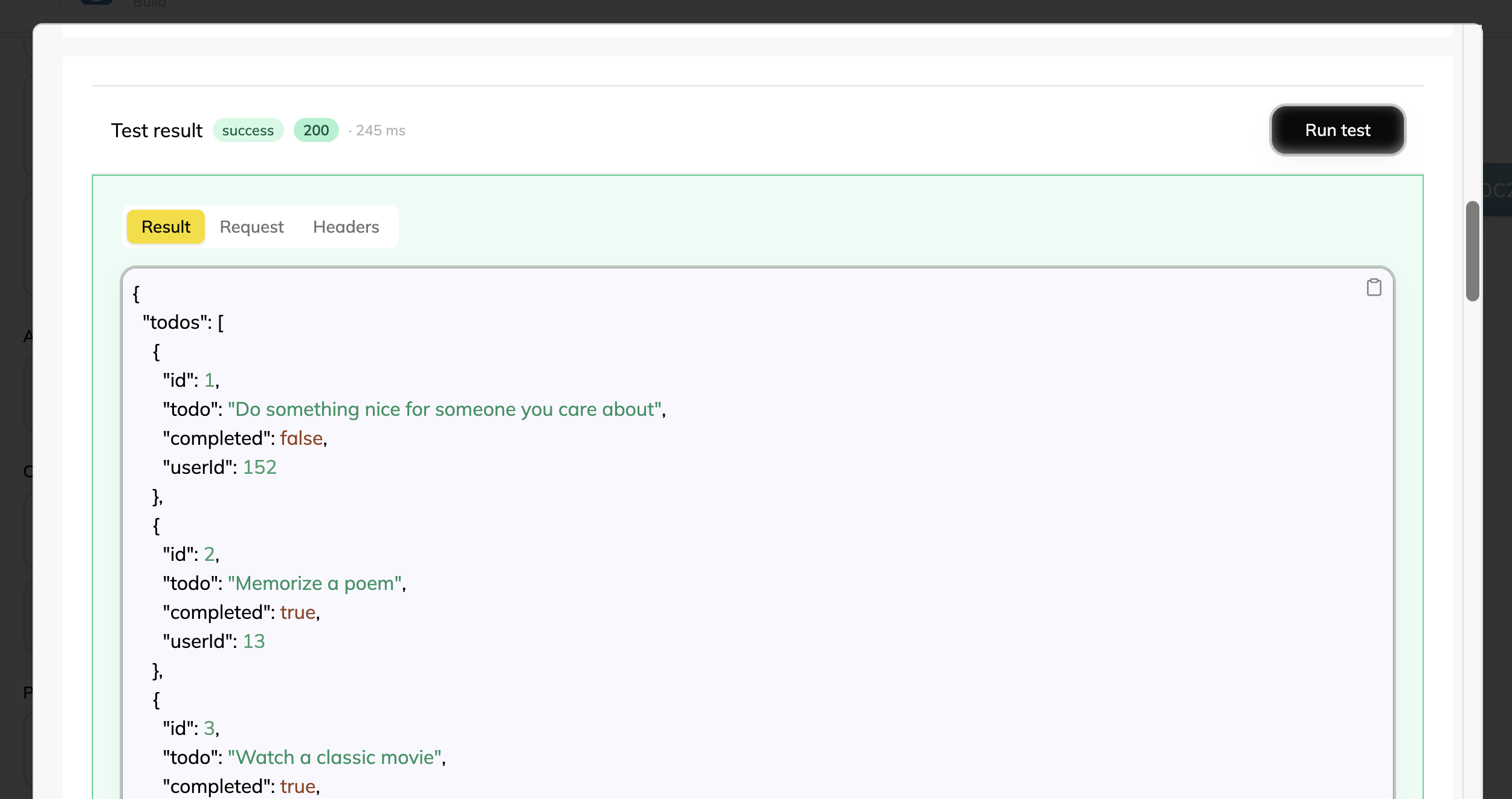 Preview how parameters resolve:
```bash
URL: https://api.example.com/{{endpoint}}
Query: search={{query}}
endpoint: "users"
query: "john"
GET https://api.example.com/users?search=john
```
### 2. Verify Variable Resolution
Check that all variables resolve correctly:
- Application variables show actual values
- System variables show placeholders
- AI parameters show example values
### 3. Test Edge Cases
- Empty optional parameters
- Special characters in values
- Large nested objects
- Array parameters
## Next Steps
- [Manage Variables →](/docs/custom-actions/variables)
- [Test Your Actions →](/docs/custom-actions/testing)
- [View Examples →](/docs/custom-actions/examples)
Preview how parameters resolve:
```bash
URL: https://api.example.com/{{endpoint}}
Query: search={{query}}
endpoint: "users"
query: "john"
GET https://api.example.com/users?search=john
```
### 2. Verify Variable Resolution
Check that all variables resolve correctly:
- Application variables show actual values
- System variables show placeholders
- AI parameters show example values
### 3. Test Edge Cases
- Empty optional parameters
- Special characters in values
- Large nested objects
- Array parameters
## Next Steps
- [Manage Variables →](/docs/custom-actions/variables)
- [Test Your Actions →](/docs/custom-actions/testing)
- [View Examples →](/docs/custom-actions/examples)